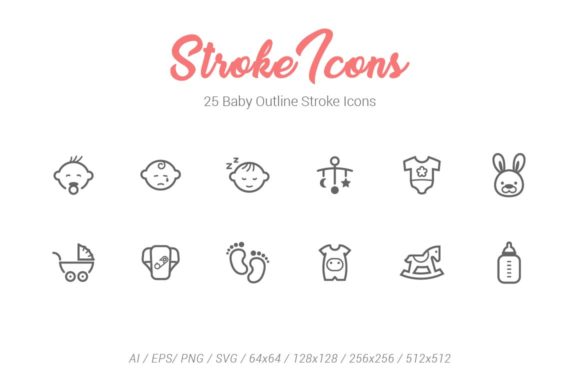
25 Baby Outline Stroke Icons: Versatile Design Assets
Creating visual content for parenting, childcare, or family-oriented projects requires a delicate balance of professionalism and warmth. The 25 Baby Outline Stroke Icons collection provides exactly that aesthetic foundation. Rather than relying on generic clip art that feels outdated or overly cartoonish, this set offers clean, modern line art that communicates care and nurturing without sacrificing design integrity. For designers, marketers, and content creators, having a cohesive set of symbols ensures that your project maintains a consistent visual language from start to finish.
At its core, this package is more than just a folder of images; it is a comprehensive design system tailored for flexibility. Whether you are building a mobile app for new parents, designing a brochure for a pediatric clinic, or creating social media templates for a maternity brand, these icons serve as essential building blocks. The outline stroke style is particularly valuable because it remains legible at small sizes while looking elegant when scaled up, making it suitable for everything from website favicons to large-format presentation slides.
Comprehensive File Formats for Every Workflow
One of the most significant advantages of this icon set is the sheer variety of file formats included. Designers know that client requirements and software capabilities vary wildly between projects. This collection eliminates the friction of converting files or searching for alternatives by providing native support for nearly every major design workflow.
- Adobe Illustrator (.ai): These files contain organized artboards, making it easy to navigate through all 25 designs in a single document. This is ideal for branding projects where you need to edit stroke weights or adjust colors globally.
- EPS8 Vector Files: Compatibility matters. By using the EPS8 standard, these vectors remain accessible to users on older versions of vector software while retaining full scalability for print production.
- Individual SVG Files: Scalable Vector Graphics are the gold standard for web development. Having individual SVGs allows developers to drop lightweight, crisp icons directly into websites or apps without worrying about pixelation on high-density screens.
- PNG and JPG Rasters: Not everyone uses vector software. For quick mockups, PowerPoint presentations, or Word documents, pre-rendered raster files save time. The PNGs offer transparency for layering, while the JPGs provide solid white backgrounds for simple insertion.
- Photoshop Shape Layers: For those working primarily in Photoshop, having dedicated shape layers means you can resize and recolor icons non-destructively without ever leaving the application.
Optimized Sizing for Digital and Print Media
Resolution independence is a key feature of this asset pack. All formats have been meticulously created in four specific dimensions: 64×64 px, 128×128 px, 256×256 px, and 512×512 px. This strategic sizing covers the vast majority of use cases encountered in modern media production.
The 64px size is perfect for user interface elements, such as navigation bars, tab icons, or bullet points in digital documents. Moving up to 128px provides clarity for feature lists and infographic details. The 256px and 512px variations are robust enough for hero sections, promotional banners, and high-resolution print materials. Because these sizes are pre-generated, you avoid the common pitfall of exporting vectors at incorrect resolutions, which can lead to blurry edges or unnecessary file bloat. For web marketing agencies and social media service showcases, having these optimized assets ready to go significantly speeds up the production pipeline.
Practical Applications Across Industries
The versatility of the 25 Baby Outline Stroke Icons extends far beyond nursery decor. While they are obviously perfect for baby shower invitations or parenting blogs, their clean geometric construction makes them appropriate for professional and commercial contexts as well.
Web Marketing and App Development: Online marketing apps and websites targeting families need intuitive navigation. These icons can represent categories like "health," "nutrition," "sleep tracking," or "milestones" within a user interface. The outline style reduces visual noise, allowing users to scan interfaces quickly—a crucial factor in user experience design.
Educational and Informational Content: Educators and trainers creating course materials or infographics benefit from consistent iconography. When explaining complex topics regarding child development or safety guidelines, visual anchors help break up text and improve information retention. The neutral stroke style ensures the focus remains on the educational content rather than distracting illustrations.
Promotional Materials and Presentations: For entrepreneurs pitching baby-related products or services, professional visuals build trust. Using a unified icon set in pitch decks and promotional flyers signals attention to detail. It elevates the perceived value of the brand compared to competitors using mismatched free resources.
Customization and Ease of Use
A major concern for many users, especially beginners or non-designers, is whether they can adapt premium assets to fit their specific brand identity. This collection is designed with customization in mind. Because the source files are true vectors, changing the color palette to match your corporate branding takes seconds. You can also adjust the stroke width to make the icons appear bolder for print or finer for delicate web layouts.
For those less comfortable with vector editing, the inclusion of multiple raster sizes and Photoshop shape layers lowers the barrier to entry. A blogger can simply drag and drop a 256px PNG into their post header, while a freelance designer can open the AI file to create a completely custom logo lockup. This accessibility makes the set valuable for hobbyists and professionals alike, ensuring that high-quality design isn't gatekept behind advanced technical skills.
Important Considerations Before Implementation
While this icon set is highly versatile, there are a few practical factors to keep in mind to ensure you get the best results. First, consider the context of your outline weight. If you are designing for large format printing, you may want to utilize the .ai or .eps files to thicken the strokes slightly so they don't disappear when viewed from a distance. Conversely, for mobile app interfaces, the provided SVGs are likely optimized perfectly for standard screen densities.
Secondly, think about consistency across your entire project. If you choose to use these baby icons alongside other symbols, ensure the other icons share a similar stroke width and corner radius. Mixing different icon styles can create a disjointed user experience. Fortunately, because these are editable vectors, you can often tweak them to better harmonize with existing brand assets if minor adjustments are needed.
Finally, always verify licensing terms for commercial use if you are working on client projects or products intended for resale. Understanding the scope of usage rights protects both you and your clients. When used correctly, the 25 Baby Outline Stroke Icons serve as a reliable, professional-grade resource that enhances communication, streamlines design workflows, and adds a touch of empathetic sophistication to any family-focused project.